 0
 0

 0
 0


Download Inspire 1 Sample 4k Video
Download Inspire 1 Sample Photo (DNG)
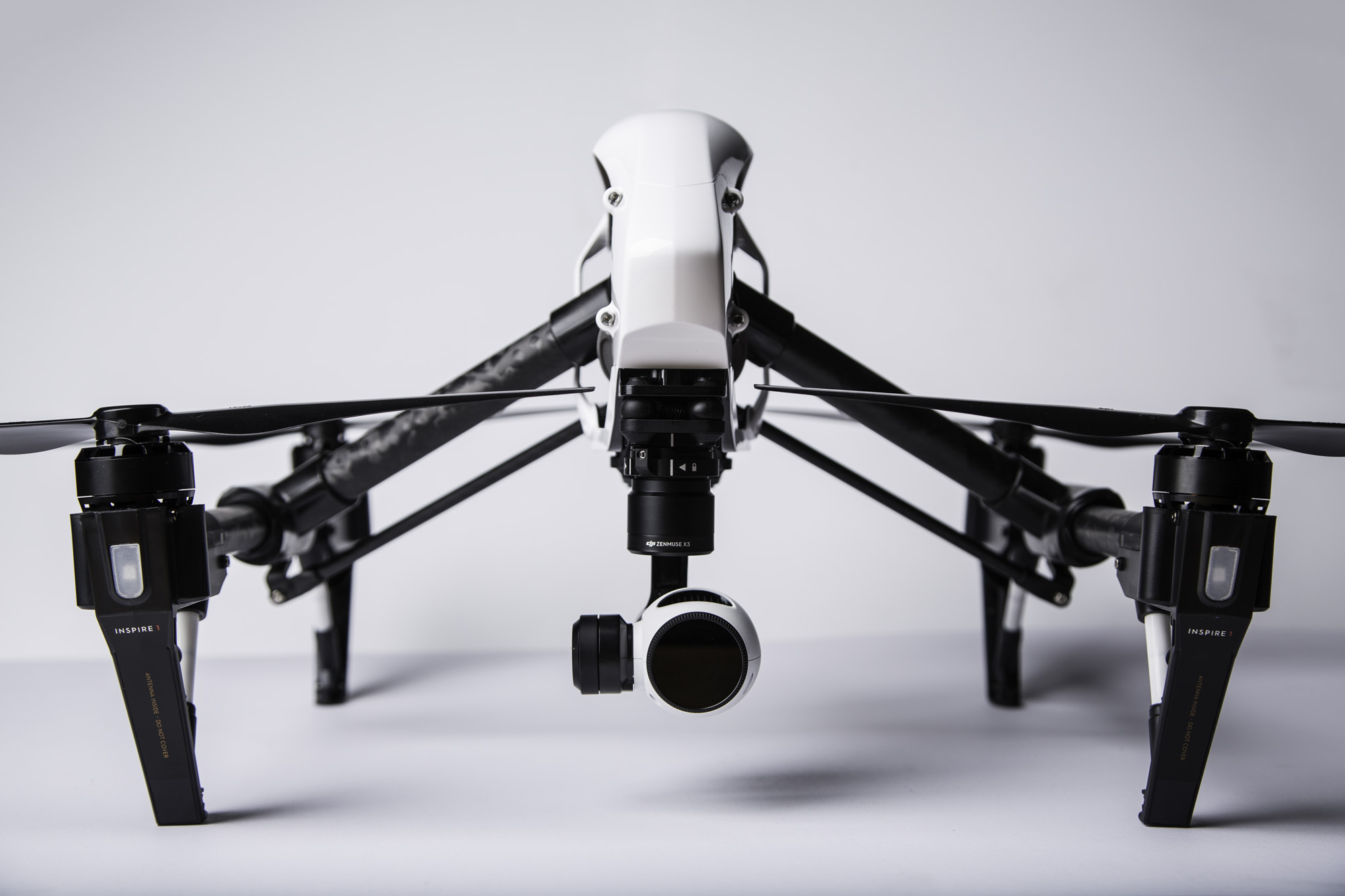
In 2014, DJI, the world’s largest consumer drone manufacturer, announced the Inspire 1. Trailing on the success of the Phantom line of easy to fly camera quadcopter, the Inspire 1 is an all-in-one system that is aimed squarely at the prosumer market segment. I’ve been following and using DJI products for a few years now and I have to say they’ve really done a nice job with the Inspire 1. Here is my full review.
Overview
My first experience with DJI was when I purchased a DJI Naza flight controller to be the brain in a custom built hexacopter I built in my garage. It wasn’t long after that they introduced the first Phantom quadcopter which quickly became the most popular and recognizable quadcopter in the world. I waited and ended up purchasing the second generation Phantom with the 3 axis gimbal. It’s clear that DJI has learned volumes from their Phantom line and has put a tremendous amount of thought and engineering into combining multiple technologies and features into the ultimate flying camera.

Camera & Gimbal
With the Zenmuse line, DJI brought us first a 2 axis and then a 3 axis gimbal for carrying a gopro camera under a Phantom quadcopter. These gimbals offered fantastically stabilized video images. Unfortunately, both versions of these gimbals were plagued with issues including jittery motors, random failures, and weak connecting ribbon cables. The gimbal and camera that come with the Inspire 1 are one modular unit. It’s safe to say DJI has nailed it this time. Some Inspire 1 users are calling it a Sky-pod (tripod in the sky). The gimbal is deadly stable. It’s so stable that it is possible to take a long exposure at night with the Inspire 1 and achieve a result without motion blur. It’s simply amazing.
One thing to keep in mind with the Inspire 1 is that it’s a little more difficult to travel with that the smaller Phantom line. The landing gear of the Inspire 1 pivot up and out of the way of the camera – which is a really nice feature. Unfortunately, you have to put the landing gear into “travel mode” in order to get it back into the included carry case. Getting the multirotor into travel mode requires you to remove the camera & gimbal, and then flipping the landing gear transformation switch up and down 4 times until the Inspire 1 raises it’s landing gear to the midpoint so you can pack it up. This has to be done while the unit is sitting on the ground because it uses it’s ground facing sensors to determine how low to lower the body of the aircraft. In other words, you can’t hold the unit in one hand and have it go into travel mode, which might be annoying if you are at a remote location and don’t have a suitable place to set the unit down while it transforms.
Stills
The 12 megapixel camera does a decent job and has several modes:
Single shoot
Burst shooting: 3/5/7 frames
Auto Exposure Bracketing (AEB): 3/5 bracketed frames at 0.7EV Bias
Time-lapse
It’s definitely a better stills camera than any of the gopro cameras like I fly on the Phantom 2. I find the dynamic range in the Raw files a little disappointing, but it’s definitely better than JPGs from either the gopro or the Inspire 1 camera.
My favorite feature of this flying camera system is the ability to control all of the camera settings including stopping and starting a recording or snapping a picture all from the smartphone or tablet connected to the controller. The Inspire 1 truly feels like the worlds first aerial camera, instead of just a hobby multirotor with a camera strapped on as an after-thought.


Video
Video comes in different modes as well:
UHD (4K): 4096x2160p24/25, 3840x2160p24/25/30
FHD: 1920x1080p24/25/30/48/50/60
HD: 1280x720p24/25/30/48/50/60
It’s definitely comparable to the latest gopro 4k video in my opinion, only it lacks that annoyingly ultra-wide fisheye lens that earmarks all gopro footage.
Here’s some sample video from Manti Utah:
Controller
If you’ve ever used a Phantom or Phantom 2 controller you’ll know that it feels like fairly cheap. DJI has really stepped up the quality on the Inspire 1 controller. There is a serious heft to the unit and it feels like a polished Apple product. DJI has integrated their lightbridge video downlink system into the Inspire 1 and controller which is allows for long range HD live view of what your Inspire 1 camera sees. It’s really well thought out with dedicated buttons or switches for common functions. Each controller come with a sturdy mounting bracket for holding your tablet or smartphone connected with USB. The HDMI output is a nice touch for those interested in live streaming for news, concerts, or other events.


Conclusion
The DJI Inspire 1 is a serious kit aimed at the video or photo pro who wants an all-in-one package that’s easy to take and go. I would even say that it’s aimed at those focusing on doing aerial exclusively, and not using drones as just another camera tool. If you are a one-man-team out shooting run and gun style like much of what I do, I think the Phantom 3 might be a better fit. Dual remote options allows you to bring a camera operator along to frame a shot while the pilot focuses on piloting. This certainly is a nice feature, but I often find it’s easier to get the shot I want if I’m in full control without a camera operator.
The package is definitely more difficult to travel with than the Phantom line. I could see myself wanting a Phantom 3 for airline travel or those smaller projects where the Inspire 1 would be too much weight and hassle.
To sum it up, I love the Inspire 1. At around $3,600 USD it’s a solid flying camera kit that comes at a premium price.